
Shared platform module

AEGIS

One foundation under every Vinkura system.

AEGIS holds the parts a department needs more than once: who may see what, where a record came from, how work moves between officers, and what was done with the information. Analysis of call and internet records, open-source material, identity checks, workflows, maps, and audit all sit on this one foundation — and so do Sentinel, Orbit, Forge, ARGUS, Voice, and our operational products.

AEGIS command center and sovereign operational intelligence platform
AEGIS brings identity, records, workflows, and command context into one governed platform.
01 / What AEGIS is

A common base, so systems stop working in isolation.

Most departments already run several systems. Each one keeps its own users, its own copy of the records, and its own idea of who is allowed to do what. AEGIS is the layer underneath: one set of users and permissions, one place where records keep their source, and one audit history covering everything built on it. New work can then be added as a module instead of another isolated application.

  • One sign-in and one permission structure across Vinkura systems.
  • Records stay connected to the system they came from.
  • Every search, view, approval, and export is written to an audit record.
  • Existing departmental systems are connected, not replaced.
AEGIS platform identity on a black field
02 / Inside AEGIS

The modules and tools that share this foundation.

Some of these are used through a named system such as Sentinel or Forge. Others are analysis workspaces used directly by authorised officers. All of them use the same identity, permission, source, and audit rules.

01
CDR · IPDR analysis

Call and internet records

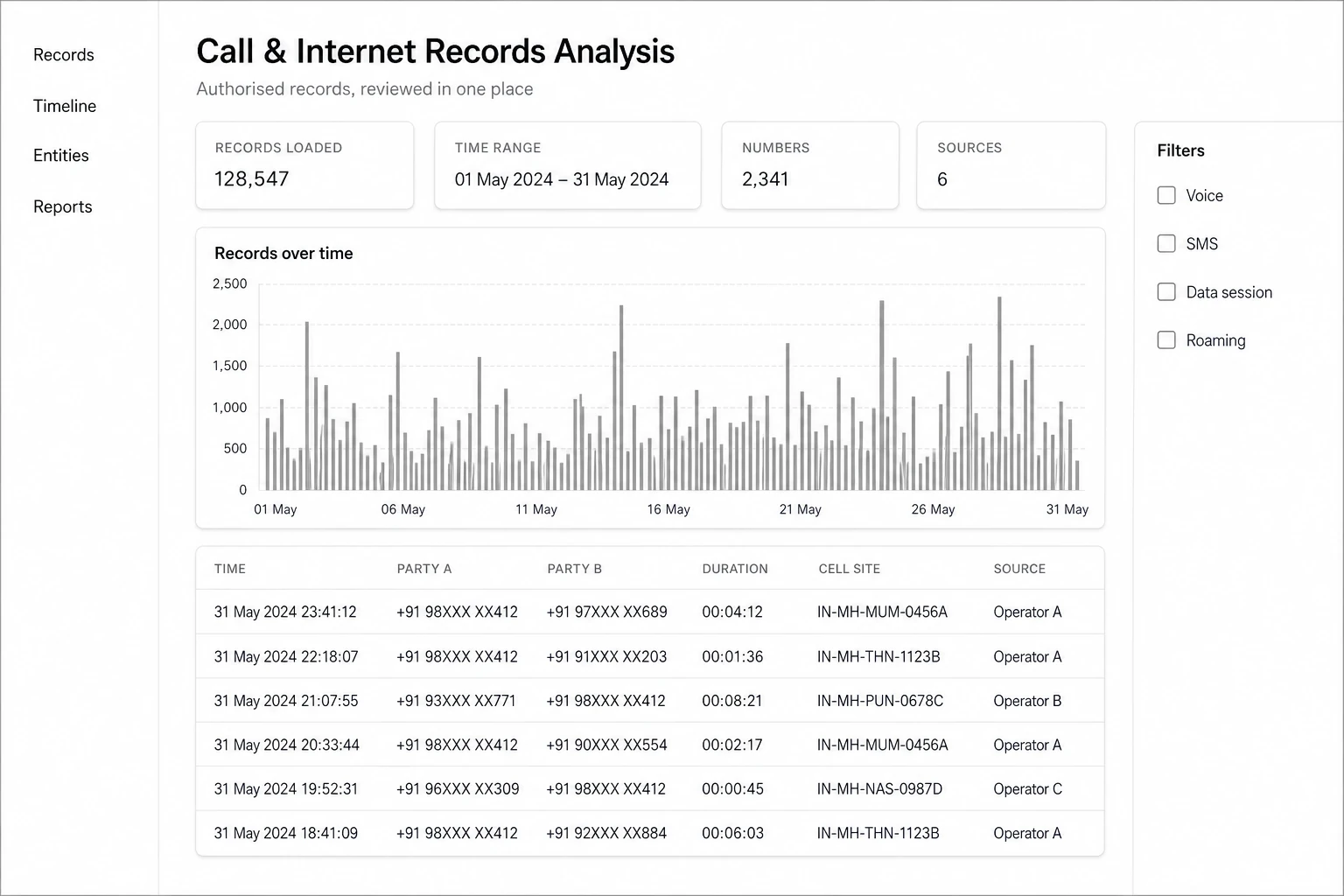
Load authorised call detail records and internet session records from different operators, place them on one timeline, and see which numbers, sessions, and cell sites actually connect. Officers work from the same view instead of separate spreadsheets.
02
OSINT workspace

Open-source information

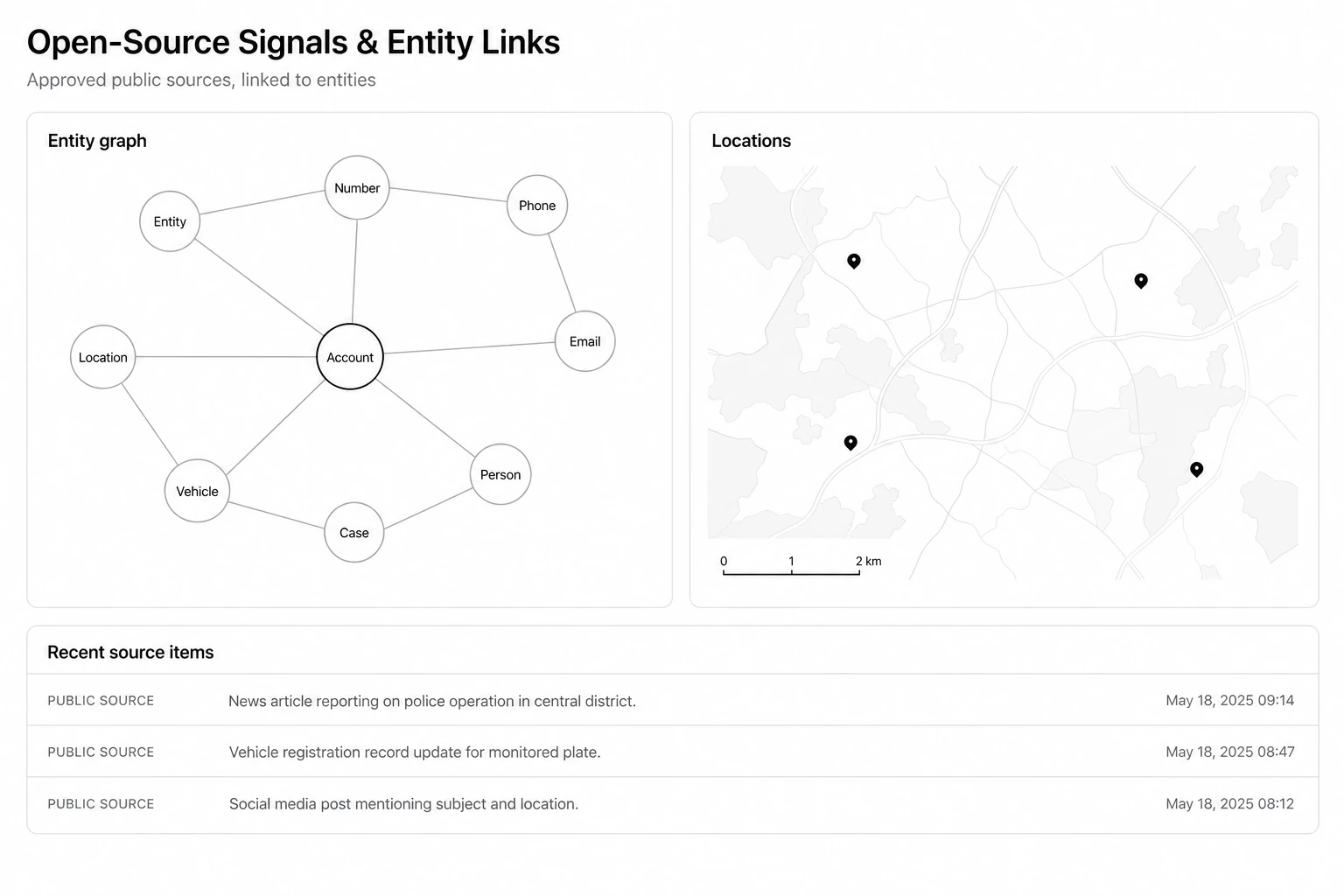
Bring approved public information — published notices, public registers, open web material — into the same case picture as departmental records. Every item keeps the source it came from, so a supervisor can check where a claim started.

03
Registration · QR checks

Identity and verification

Register people, vehicles, or service providers once, verify them at a checkpoint with a QR or document check, and keep a record of the officer who confirmed the match. Pehchan is this part of AEGIS working in the field.

See Pehchan in the field
04
Forge

Workflow and approvals

Turn a written procedure into the path the work actually follows: who raises it, who checks it, who signs it, and what happens when something is missing. Nothing is approved without a name against it.

Examine Forge
05
Orbit

Maps and field geography

Put incidents, units, routes, sectors, and jurisdiction boundaries on a shared map, so a control room and a field team are talking about the same place.

Examine Orbit
06
Sentinel

Command and situational picture

Combine incidents, assignments, alerts, and mission status into one command view, with escalation and after-action review built around it.

Examine Sentinel
07
ARGUS

Visual evidence

Index authorised CCTV, drone, and body-worn material by time, place, and source so a relevant interval can be found and exported without breaking the handling record.

Examine ARGUS
08
Voice

Field voice and reporting

Convert authorised radio traffic, calls, and spoken field reports into text and structured entries, with an officer confirming anything that becomes an official record.

Examine Voice
09
Accountability

Audit and access record

Every search, view, edit, approval, and export is written down with the user, the role, the record, and the authority under which it was done. An inspecting officer can reconstruct what happened without asking the vendor.

10
Integration · edge

Connections and offline working

Connect approved existing systems through secure interfaces instead of replacing them, and keep working where the network does not reach, with reconciliation once devices are back online.

03 / What officers actually see

Plain screens for people who are not looking at a screen all day.

CALL AND INTERNET RECORDS

Connections placed on one attributable timeline.

Authorised call and internet records from approved sources are aligned by time, number, session, and cell site. Analysts can follow a connection without separating the result from the record that produced it.

  • Operator records normalised into one review workspace
  • Timeline, session, and cell-site context kept together
  • Every query and export retained in the audit record
AEGIS call and internet records workspace showing an IPDR timeline, linked sessions, and source records
OPEN-SOURCE INFORMATION

Public material, still attached to its source.

Approved public information is pulled into the same workspace as departmental records, linked to the people, numbers, vehicles, and locations already in the case, and shown on a plain map. The link between two entities is only as strong as the record behind it, so the record stays visible.

  • Entity links drawn from authorised records, not guesswork
  • Source and time retained on every item
  • Location shown alongside the same entities
AEGIS open-source information workspace showing an entity link graph, a light map panel, and a list of source items
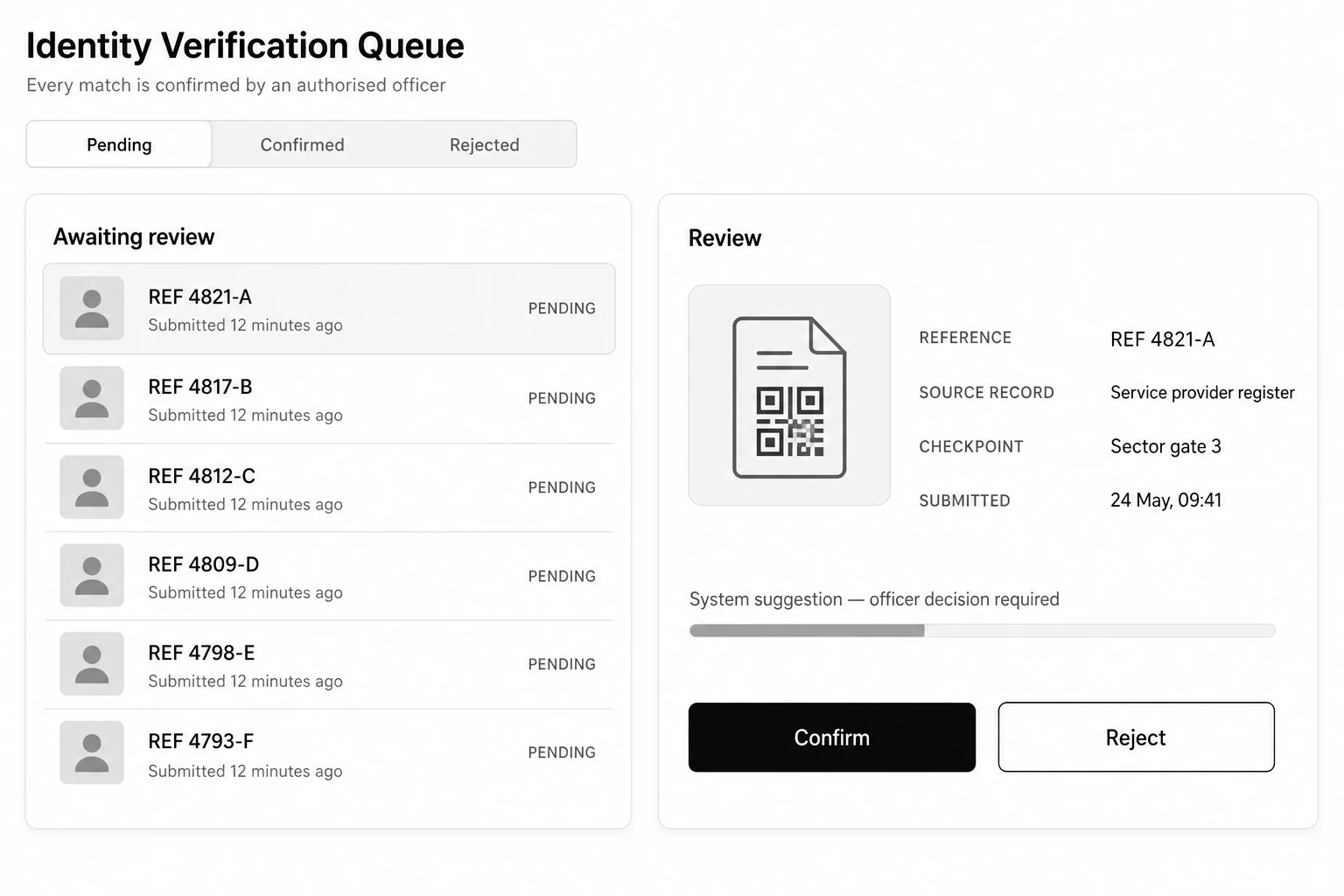
IDENTITY AND VERIFICATION

A match is a suggestion until an officer confirms it.

Verification requests arrive in a queue with the source record, the checkpoint, and the time they were raised. The system can propose a match; the decision, and the name attached to that decision, stays with the officer reviewing it.

  • One queue for pending, confirmed, and rejected checks
  • Source record and checkpoint shown before any decision
  • Confirmation and rejection both recorded against a user
AEGIS identity verification queue with pending review list and an officer review panel with confirm and reject actions
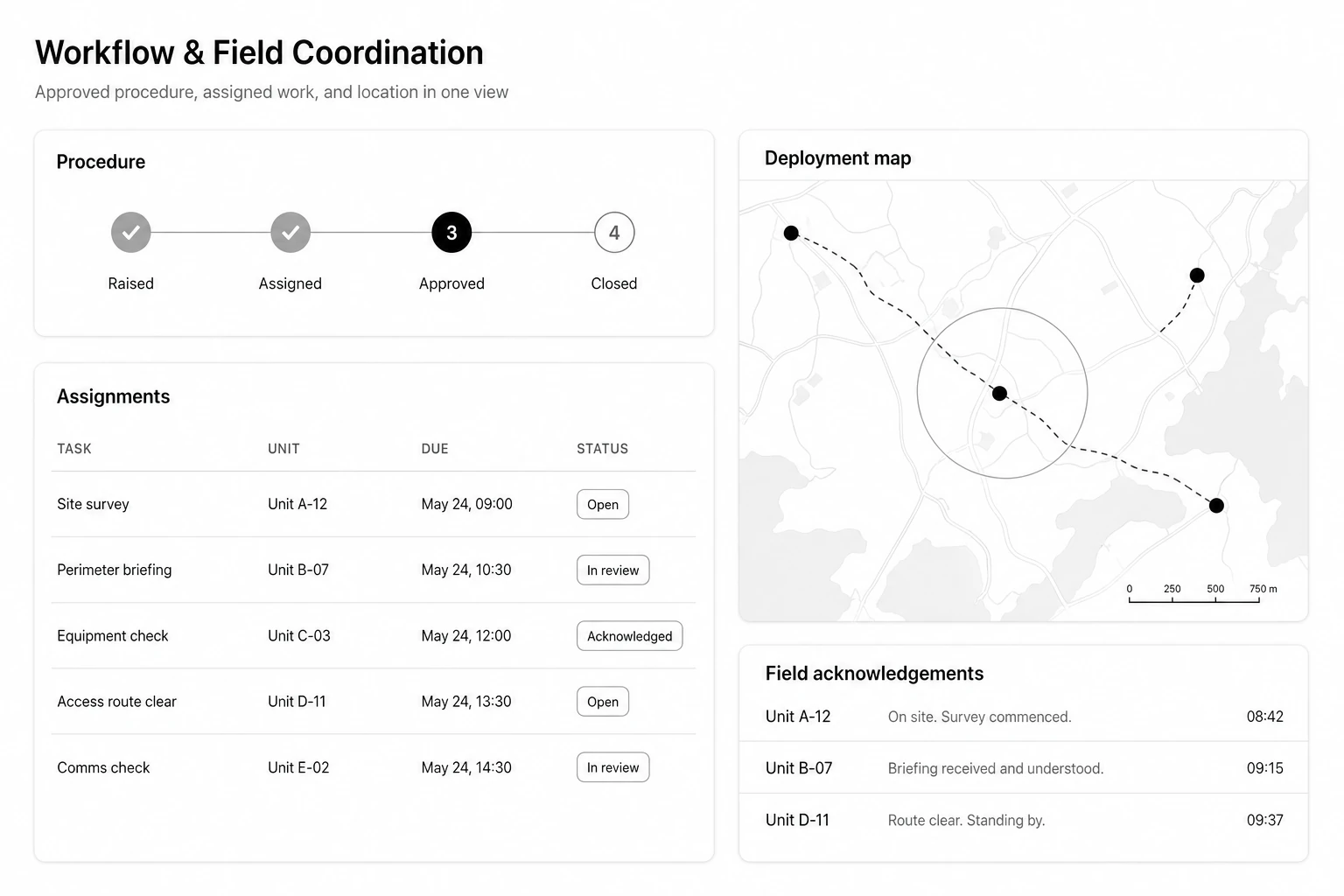
WORKFLOW AND FIELD COORDINATION

Procedure, assignment, and place in one view.

The approved procedure is shown as the stages the work has actually reached. Assignments carry the unit, the deadline, and the current state, and the same task appears on the map the field team is working from, with acknowledgements coming back as they happen.

  • Stages reflect the department’s own procedure
  • Assignment, due time, and status against each unit
  • Field acknowledgement recorded, not assumed
AEGIS workflow and field coordination view with a procedure progress rail, assignment table, deployment map, and field acknowledgements
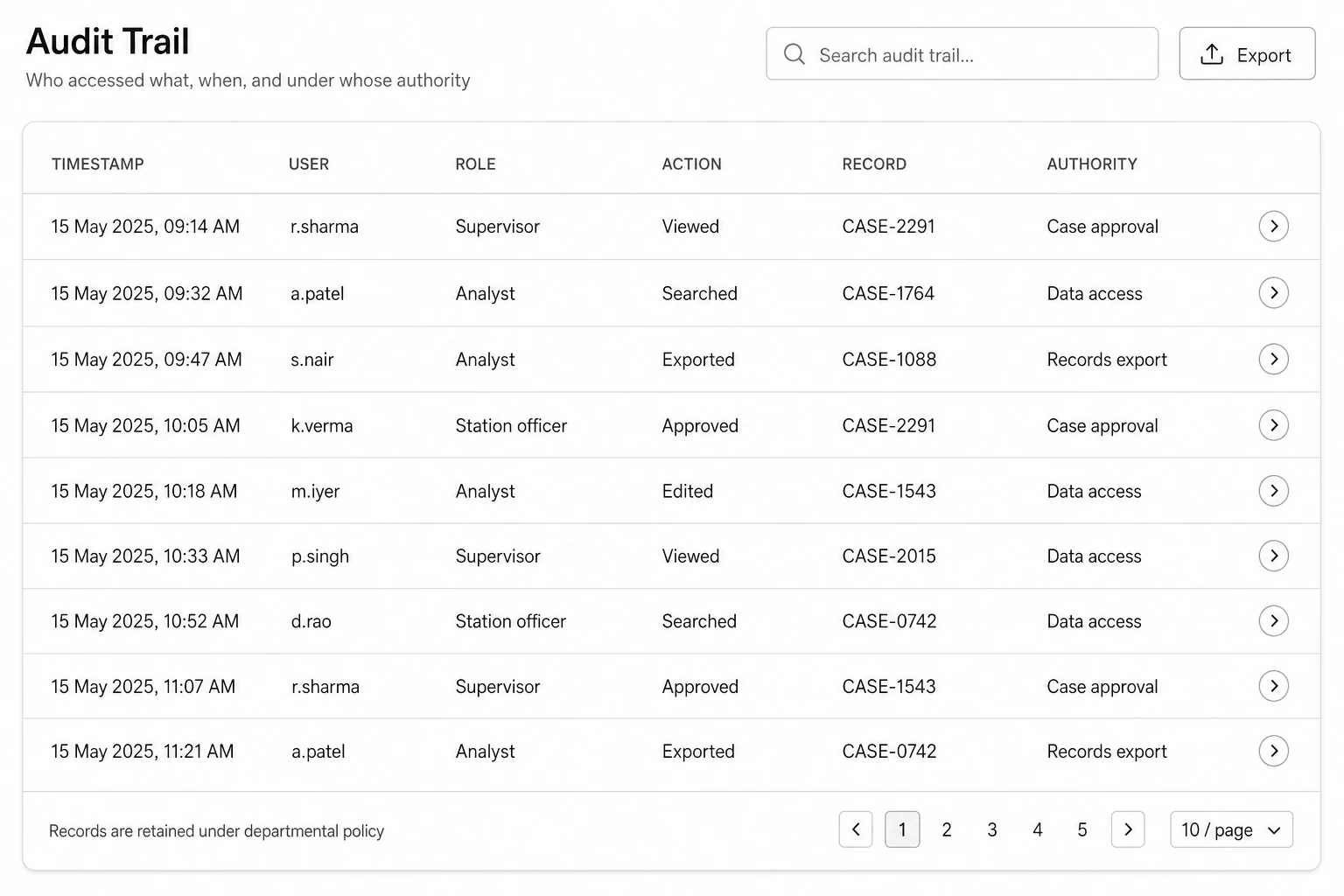
AUDIT AND ACCESS RECORD

Who accessed what, when, and under whose authority.

The audit record is a working screen, not an export request raised months later. Supervisors and inspecting officers can search it directly, follow a single record across users and roles, and take out what they need for a review.

  • Access, search, edit, approval, and export all recorded
  • Filter by user, role, record, or authority
  • Retention set by departmental policy, not by us
AEGIS audit trail screen listing timestamp, user, role, action, record, and authority for each entry
04 / How it works

Connect, structure, operate, account.

01

Connect

Approved records, files, and feeds are brought in through secure interfaces. Existing departmental systems stay where they are.

02

Structure

Entities, permissions, location, source, and workflow state are resolved into one operating picture that every system can read.

03

Operate

Each role gets the screen it needs — control room, field officer, analyst, supervisor, administrator — and nothing beyond it.

04

Account

Source, human decisions, policy checks, and system actions are preserved so the work can be reviewed later.

05 / Where it runs

Configured for institutional conditions.

AEGIS is deployed on-premises, in a sovereign cloud, or across a controlled hybrid architecture. Offline and edge operation, reconciliation, environment policy, and separation between departments are handled by the platform, not rebuilt inside each product.

On-premises

Runs inside departmental infrastructure where data is not permitted to leave the premises.

Sovereign cloud

Runs in an approved Indian cloud environment under departmental accounts and controls.

Hybrid and edge

Command in one environment, field devices working offline in another, reconciled once connectivity returns.

06 / Governance

Control remains with the institution.

Access rules, retention periods, and approval authority are set by the department. We configure them; we do not hold them.

01Encryption in transit and at rest
02Role and attribute-based access
03Environment and tenant isolation
04Versioned policy enforcement
05Source-level provenance
06Comprehensive audit logging
07 / What changes

What a shared foundation changes day to day.

Officers across units work from the same record instead of reconciling copies.

The path from an authorised record to an accountable action is shorter and visible.

Fewer disconnected point systems to procure, integrate, and maintain separately.

Institutional data, logic, and audit history remain under departmental ownership.

09 / Departmental briefing

Start with the operating problem, not a software catalogue.

Tell us which records you hold, who needs to act on them, and what has to be provable afterwards. We will map that against AEGIS and set out a deployment path you can evaluate.